Getting Started
Get oriented with the Vidhi platform and start using AI-powered legal tools effectively.
Welcome to Your AI-Powered Legal Workspace
This guide will help you get oriented with the Vidhi platform and start using our AI-powered legal tools effectively.
Video Walkthrough
What You’ll Learn
- Platform navigation and key features
- How to set up your workspace
- Essential workflows for daily legal work
Platform Overview
Your Main Navigation
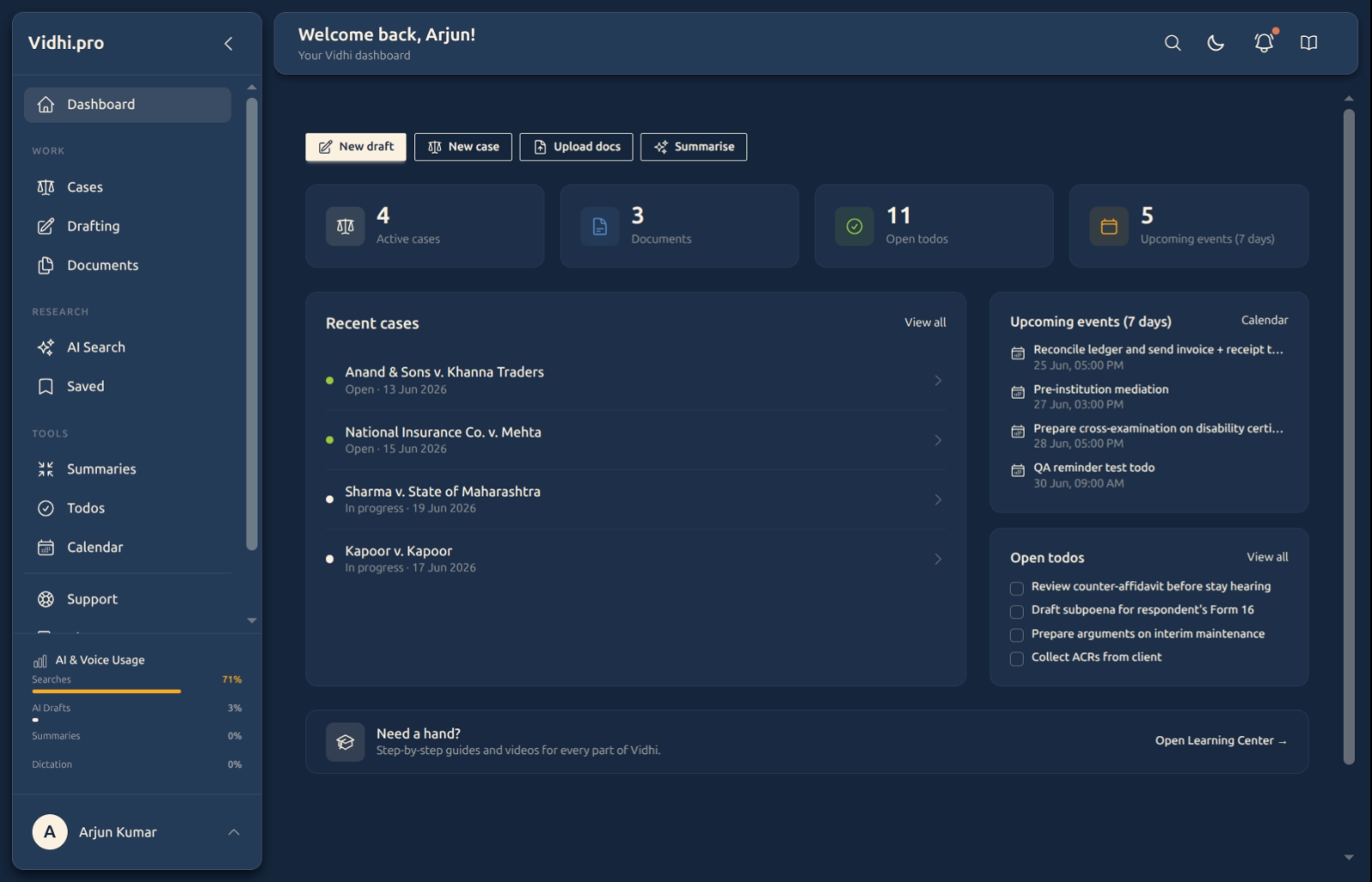
When you log in, you’ll find the main tools in your sidebar:
Work
- Cases - Manage active legal cases and matters
- Drafting - Generate and edit legal documents with AI assistance
- Documents - Secure storage and management for your legal files
Research
- AI Search - Find relevant legal precedents and authorities
- Saved - Your saved searches and research
Tools
- Summaries - AI-powered document analysis and key insight extraction
- Todos - Organize tasks with priorities and due dates
- Calendar - Track deadlines, court dates, and appointments
Essential First Steps
1. Complete Your Profile Setup
- Navigate to your profile settings
- Add your contact information
- Select your country from the dropdown
- Review your account details
2. Upload Your First Document
- Go to Documents
- Use the upload feature to add a PDF or Word document
- Try the Summaries tool with your uploaded document
- See how AI extracts key information and insights
3. Create Your First AI-Generated Content
- Access Drafting from the sidebar
- Try creating a simple legal document with AI assistance
- Learn to refine and improve AI-generated content
4. Set Up Your Calendar
- Open the Calendar tool
- Add important deadlines and court dates
- Set up reminder notifications for critical dates
5. Organize Your Tasks
- Use Todos to add your priority tasks
- Set due dates and priority levels (high, normal, low)
- Mark tasks as complete when finished
Navigation Guide
Sidebar Menu
The left sidebar contains all your main tools:
- Work - Cases, Drafting, and Documents
- Research - AI Search and Saved searches
- Tools - Summaries, Todos, and Calendar
Search Functionality
- Use the search feature to find documents and content
- Search works across your uploaded documents
- Apply filters to narrow down results
Core Features Overview
Document Management
- Upload PDF, Word, and other document formats
- Preview documents directly in the browser
- Download documents when needed
- Share documents with secure links
- Organize with list and grid views, sorting, and category filters
AI Features
- Document Summarization - Extract key insights from lengthy documents
- Drafting - Generate legal documents with AI assistance
- AI Search - Find relevant legal authorities and precedents
Workflow Management
- Calendar Events - Schedule meetings, court dates, and deadlines
- Todo Items - Track tasks with priorities and due dates
- Cases - Manage legal matters and associated documents
Getting Help
Support Resources
- Learn Section - Comprehensive guides for each tool (you’re here now!)
- Support - Contact our team for assistance
- FAQ - Answers to common questions
What’s Next?
Immediate Actions (First 30 Minutes)
- Complete your profile setup
- Upload one document and try Summaries
- Create a simple document with Drafting
- Add one task to your Todos
First Week Goals
- Upload and organize your key documents
- Set up important calendar events and deadlines
- Create your first case in Cases
- Try each AI tool with your real content
First Month Objectives
- Establish regular workflows using the platform
- Save your frequent searches for one-click reuse
- Organize your documents using views, filters, and sorting
- Use AI tools regularly to improve your efficiency
Security and Privacy
For how we handle security, encryption, and data ownership, see our Privacy Policy and Terms. In the product, your documents live in your private account scope and are shared only through links you create — and can revoke at any time.
Ready to Begin?
Start exploring the platform! Each tool includes help features and this Learn section provides detailed guides for every feature.
Recommended Learning Path:
- Documents - Learn document upload and organization
- Drafting - Master AI-assisted document creation
- Summaries - Efficiently analyze and understand documents
- Calendar - Track important dates and deadlines
- Cases - Organize your legal matters
Welcome to Vidhi! 🚀
Published: July 03, 2026